bRIEF
Portfolio project overview.
This project reflects a series of ongoing assignments spanning the semester. The goal of the project was to take each student through an actual project lifecycle, starting with concepting and ideation and ending with an actual design direction.
Course component 1
Project idea.
This project started by first identifying the problem I was seeking to solve. From the course outline, the mock project had to solve a problem for either a current or past employer. Additionally, the following criteria had to be met:
Meets an actual design need for the company.
Is a complex project requiring a development team with multiple creative skill sets (e.g. writing, editing, graphic design, web design, front-end coding, print production, illustration, etc.)
Involves an area for which user data can be gathered.
Does not involve confidential or inappropriate information.
I began by considering the product I work on at Microsoft. It is fairly young and has only been available to customers for a few years. The roadmap ahead is exciting, but I wanted to focus on a problem that didn’t already have a team working on it. I also wanted to avoid anything even remotely resembling confidential material or information.
These two factors took me back to a problem I encountered when first joining Microsoft. The problem I repeatedly kept running into was knowing exactly where meetings were being held. As you can imagine, Microsoft has a huge amount of buildings spread across multiple campuses. This reality makes it difficult for someone to locate a meeting room if it is in a building or on a floor they don’t regularly visit. Because I didn't know where meeting rooms were, I would regularly arrive late after spending wasted time searching for the right room. I’m excited about working to solve this because of how simple the problem is and how impactful a solution can be.
To read the project idea report, open this Google doc.
Problem.
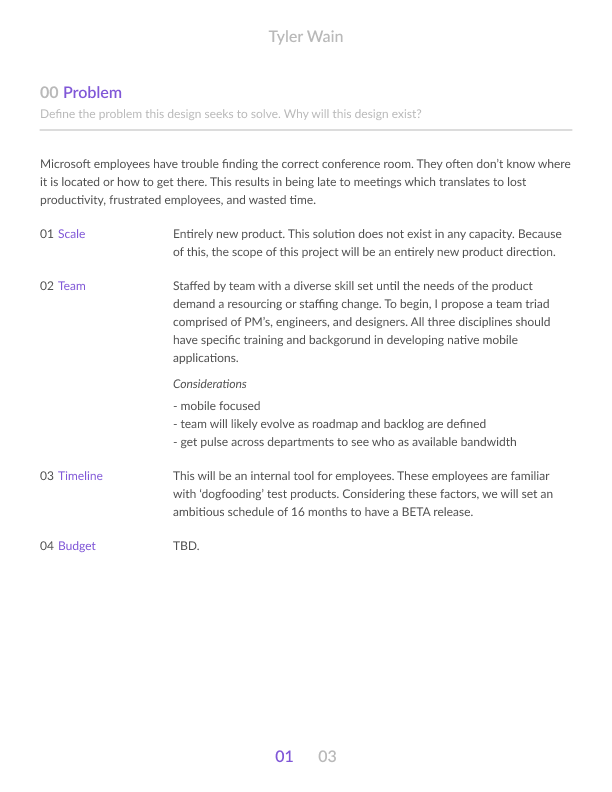
Microsoft employees have trouble finding the correct location for their meetings. This core problem creates other problems as a result; being late to meetings, spending wasted time searching, etc.
Project goal.
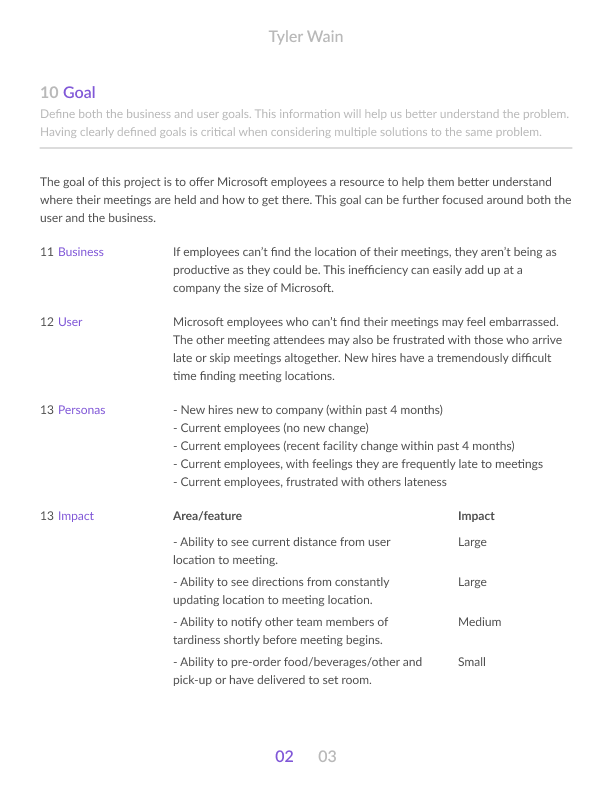
Help Microsoft employees find where their meetings are. To do this, I am envisioning a product or service that locates where the physical meeting spaces are. I will investigate the possibility of integrating with existing employee tools to gather information like:
Outlook (calendar, schedule, location, timing, etc.)
Teams (collaboration space, notify meeting attendees, etc.)
Comfy (an internal tool that allows employees to change the individual temperature of rooms and spaces)
Campus map, etc.
I believe a product like this addresses a very real problem Microsoft employees face. I have spoken with many fellow designers and teammates about the challenge of knowing where meeting spaces are. Providing a simple solution could actually be used by both new hires and seasoned veterans alike. Furthermore, the fact that Microsoft continues to both redesign their existing campuses and build new ones tells me this problem will continue to exist for years.
Course component 2
Creative brief.
The second course component required me to create a brief documenting the project objectives. This would act as a reference point for me to return to throughout the project.
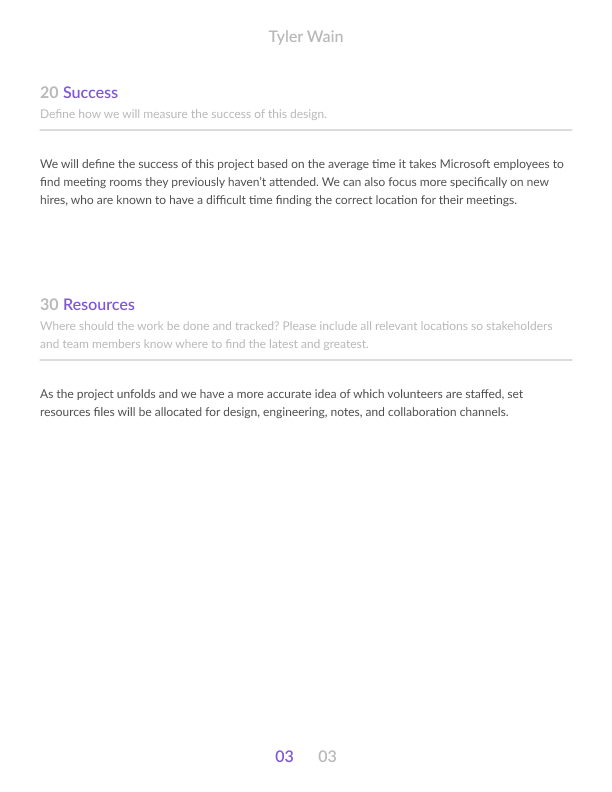
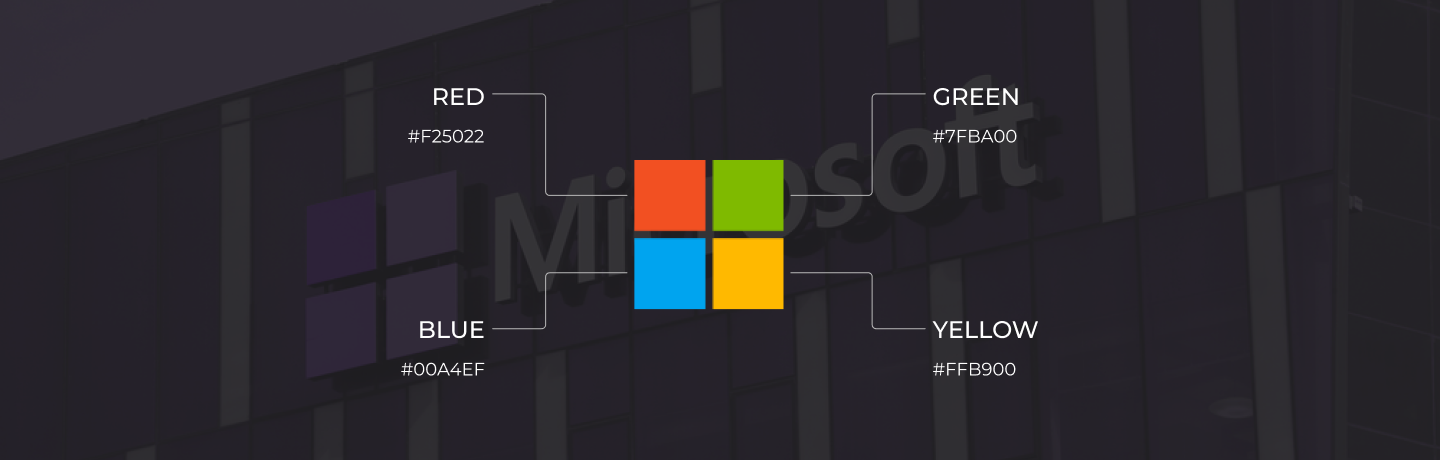
The preliminary product name was Microsoft Meeting Locator. My initial thinking was that it would exist as a standalone product or integrate with other Microsoft products. If it was to be a standalone product, it would incorporate the existing Microsoft brand styling.
To read the creative brief, open this strategy PDF.
Course component 3
Kickoff meeting.
Once the problem was defined and I had a general direction of where the product was headed, I began planning for a kick-off meeting. This would act as an opportunity for me to review the project direction with a stakeholder. I prepared a series of questions for this meeting to ensure the product I was building was solving actual user problems.
To read the kickoff meeting report, open this Google doc.
I began the interview by introducing the problem I sought to solve. This gave the interviewee enough information to understand the reasoning why I had asked him to participate. I was careful not to disclose so much as to have him jump to conclusions, but merely enough to understand the problem I was trying to solve.
As we spoke longer, he was obviously becoming more comfortable and transparent with his phrasing. If I were to continue conducting more interviews, I would try to remember this and put my most important questions further towards the bottom. That way, we could have time to become comfortable and familiar with each other on questions that may not add as much value as others.
This initial meeting was also done over the phone. In the future, I think it would be great to meet employees in person. This would give us an opportunity to sketch and draw, as well as sit and chat together.
Overall, this was a great resource for this project. I learned a lot and felt validated in the problem I am seeking to solve. It was obvious that he had more difficulty finding rooms when he was a new employee but still finds it just as difficult whenever visiting a new building.
Course component 4
Project schedule.
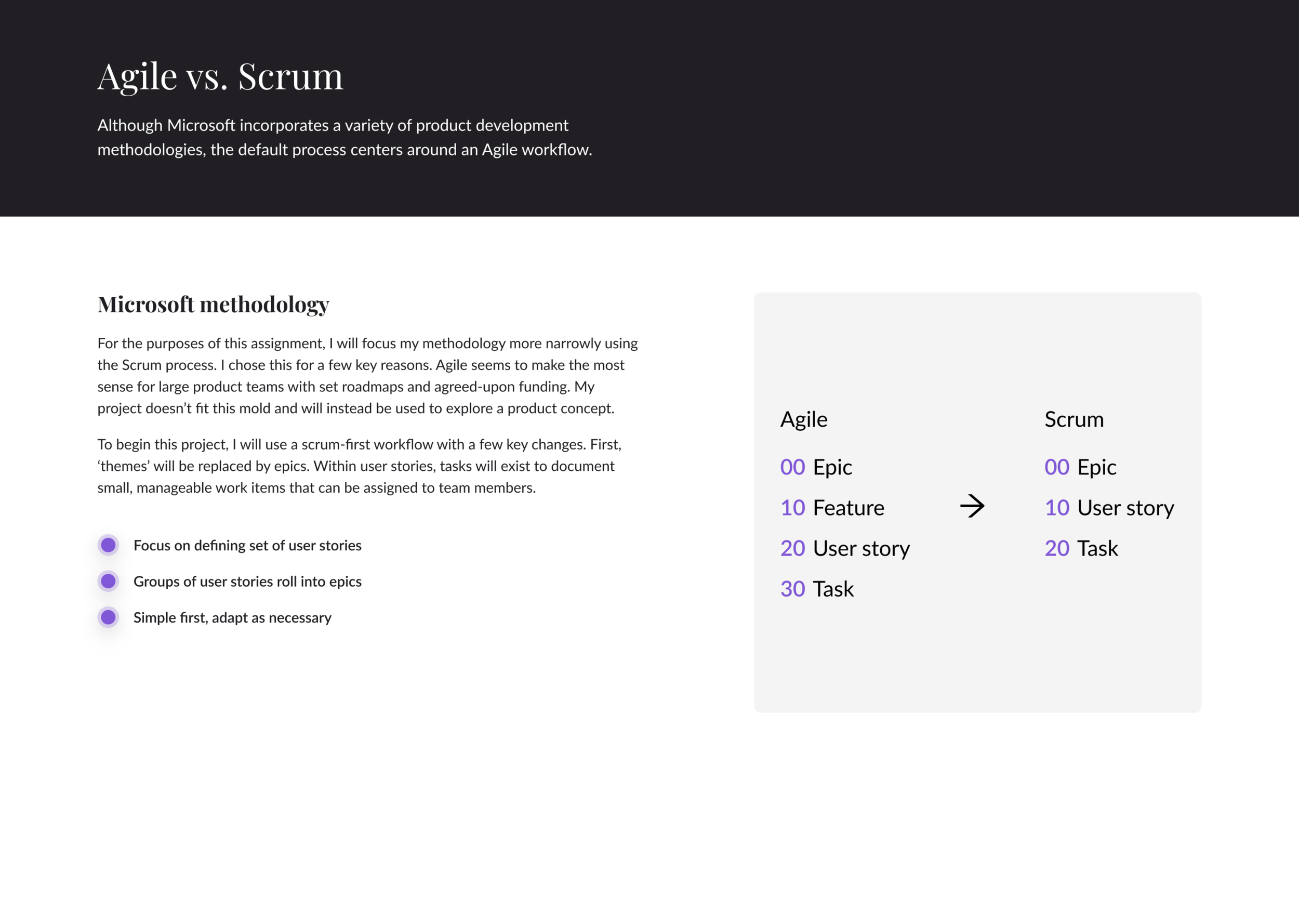
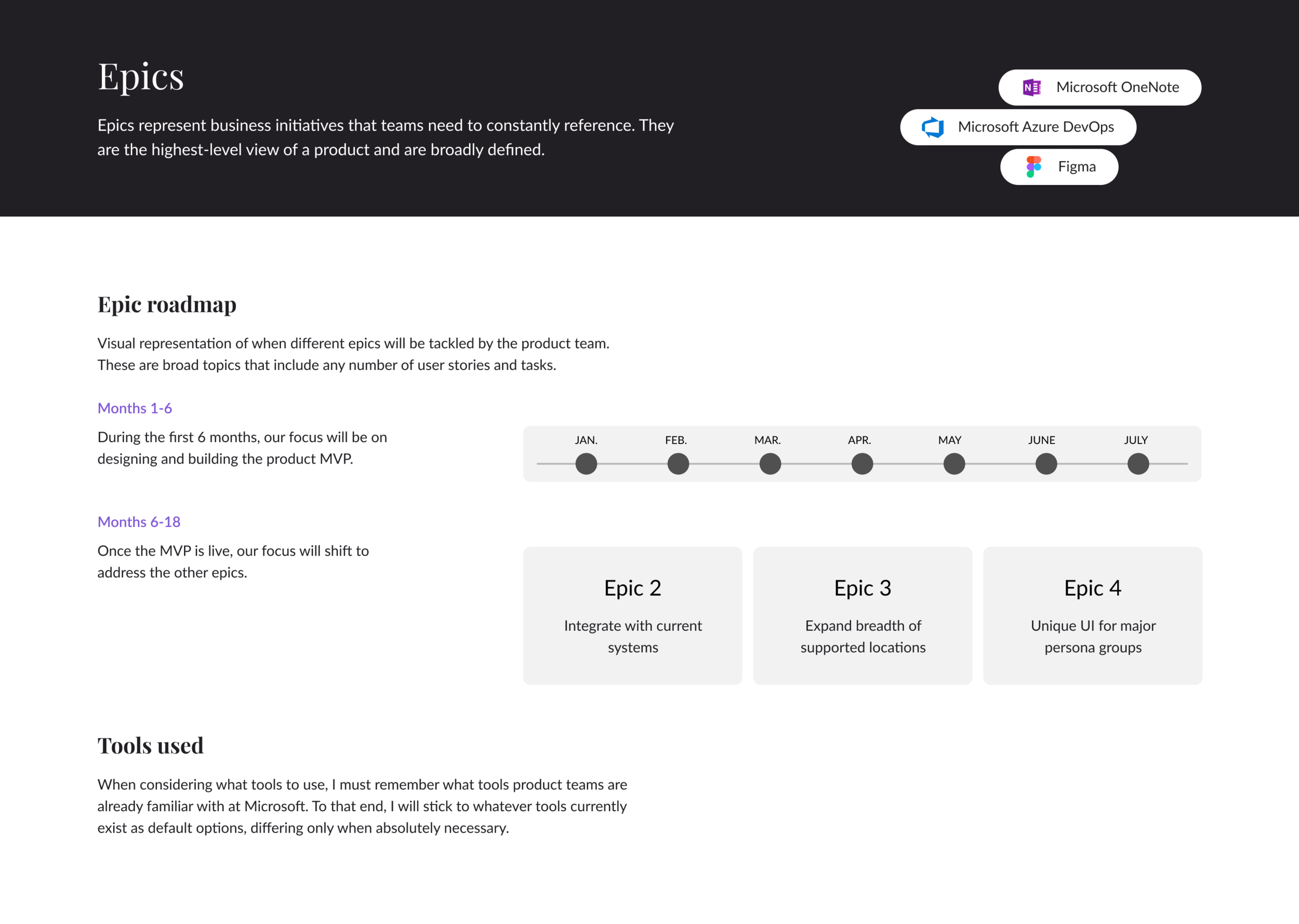
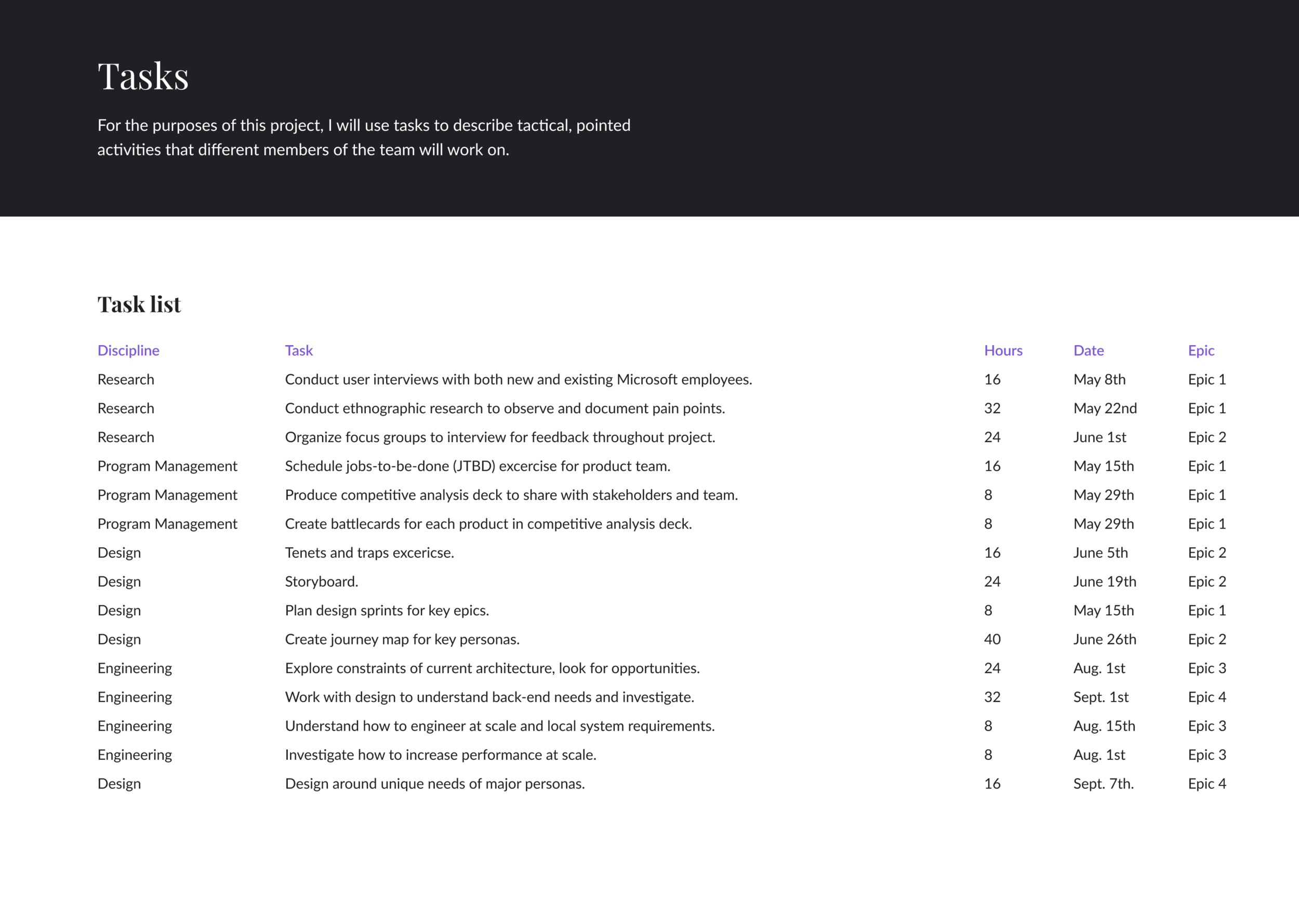
For this component, I created a timeline for when all the major deliverables would need to be completed. I projected time estimates for each task and assigned them to different fictional team members. Once I had the list of items to be completed and the expected time to complete, I created groups of ‘Epics’ to sort and prioritize.
Course component 5
Project team report.
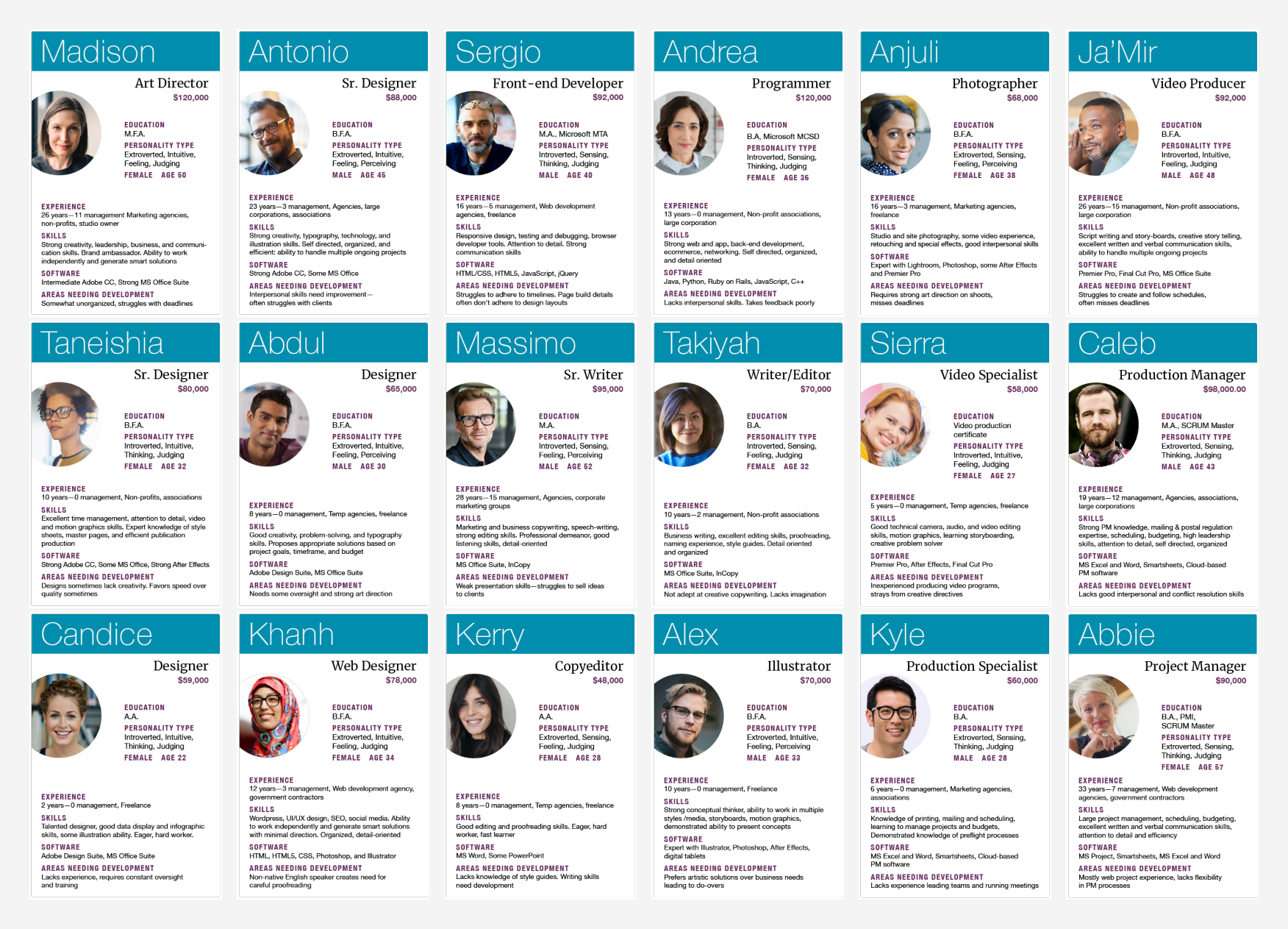
For this component, I simulated the process of building a design team. Candidate profiles were provided to make selections. Each persona included name, role, salary, education, personality type, sex, age, experience, skills, software, and areas needing development.
When thinking about staffing the team for this project, I strove to consider a range of factors. I began with thinking about the specific technical skills required to take a project from concept to product. I considered personality traits, age, background, and salary. I also tried to prioritize what topics would be most important and most difficult to hire for. The topics I will cover in this team report will include the following:
Hiring for the project: How to find the right people for this specific project.
Creating a successful team: How to bring together different personalities and styles that become stronger as a whole than they are as individuals.
Building a team we can afford: How to build the best team and pay them well all while staying under budget.
To read the full team report, open this Google doc.
Hiring for the project.
This project is to build an app that Microsoft employees can use to better understand how to navigate around campus to find their meeting locations. An effort like this requires a team with specific technical training in the following areas:
Project Management: Project Managers are needed to keep the team progressing towards the right goal. They will help make planning and timeline decisions or weigh in when the team faces two options on how to proceed. They are our ‘mini CEO’s’ and are vital to the success of a project.
Design: Designers are needed to think through the user experience and visuals of the product experience. Initial designs can be simple and reserved as we learn more about our users needs and the actual problem the product is solving. Looking ahead, different types of designers would likely join the team. Illustrators, content designers, visual artists, etc. To start, I believe a well-rounded Product Designer would be most valuable. Their skills cover a wide array of design disciplines.
Development: Simply put, the app needs to get built. To be built, we need developers or engineers. Microsoft refers to both front-end and back-end developers as ‘engineers.’ ‘Web-developers’ are those engineers that build front-end landing pages or static sites. For this project, we will need a combination of back-end and front-end engineers, preferably with mobile development experience. If budget allows, it would be great to have developers dedicated to either side of the experience, but a full-stack engineer would also do in the short-term.
When considering how to prioritize the disciplines needed (listed above), I believe there is some level of importance to consider. I would prioritize them as follows, high-priority to low-priority:
Development
Design
Project Management
I believe this is the correct hierarchy because the product could still exist with just development. It wouldn't have been planned well or likely be a great experience, but it would exist. Both design and project management couldn’t bring an actual product to life without the development team. Furthermore, I prioritized design over project management.
Without a doubt, this project will require the triad above to work together. Fortunately, Microsoft fosters a healthy environment of collaboration across these disciplines so getting them together to solve a common problem won’t be anything new. To that end, I believe it will be more challenging to find the right blend of personalities.
Creating a successful team.
After considering the role (design, development, PM), the next set of considerations deal with each candidate's personality traits, skills, etc. For this project to be successful, I must consider these traits when hiring. Of the available metrics by which to judge the available talent, I have prioritized them by importance:
Role: (discussed above)
Personality type: Blend of extroverted and introverted. If possible, more extraverted than introverted to ensure open communication of potential problems or challenges. This would come with its own set of challenges, but I believe it would be worth it.
Skills: This project will be a digital app. Therefore, we will need a team staffed with talent familiar with creating digital experiences.
Experience: A blend of experienced and junior talent helps team members grow their skills. It also offers an opportunity for those experienced to become mentors.
Areas of improvement: Understanding team members gaps can help provide opportunities for growth. Being aware of them now will help ensure we have the right people to help others grow instead of double-down on their weak spots.
Other (age, sex, education, software)
Considering the challenges and obstacles associated with creating an entirely new product, I believe this list will help me staff this project appropriately. It’s most important to have the right technical skill followed by the right blend of personalities. I will be looking for ways to create a well-rounded and diverse team that will challenge each other.
Who made the cut?
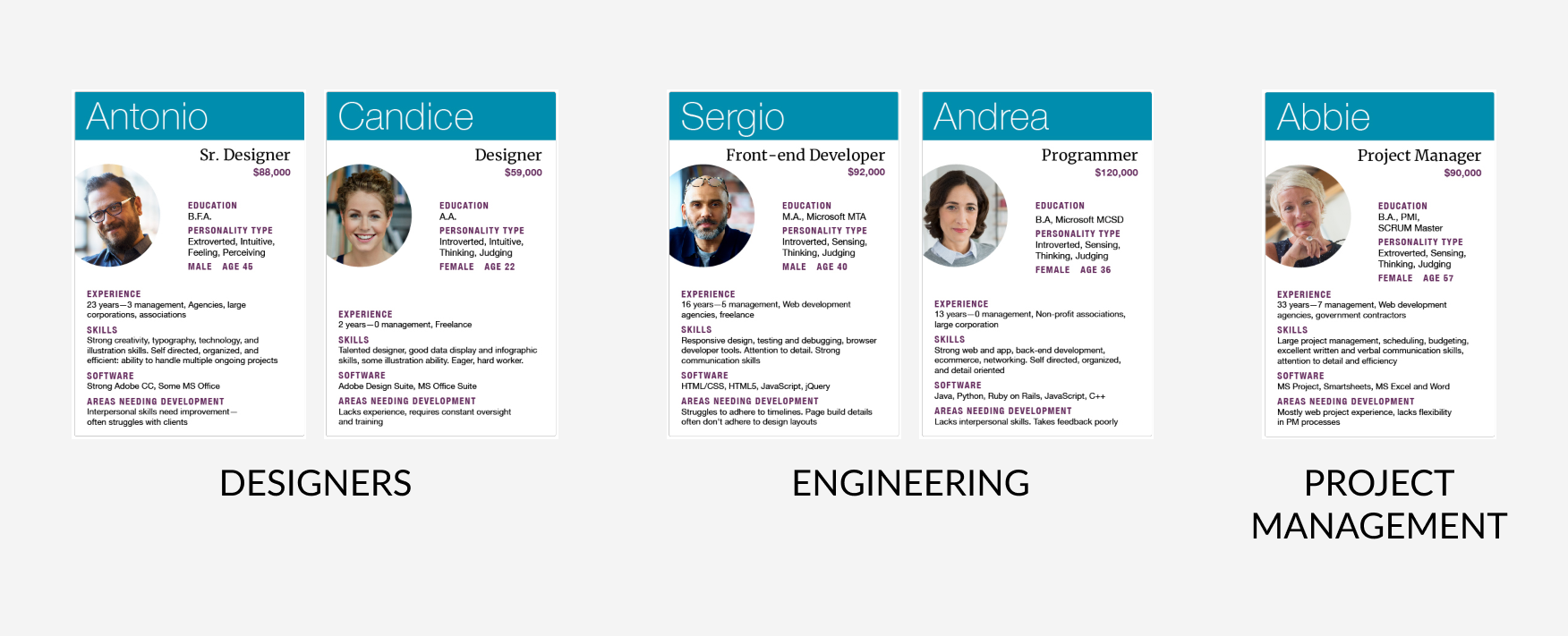
When considering all the available candidates to hire, I first focused on the disciplines needed for this project. Here are all the available engineers, designers or PM candidates:
The other candidates were not included simply because they didn’t have the technical skills required for this project. As stated previously, the most important factor when considering who to hire was their technical skill. Personality and cost were considered after. Some of the candidates above would actually have been better additions from a personality standpoint. Many were also much cheaper to hire. But given the goals and timeline for this project, the tough decision was made to first narrow the list by discipline.
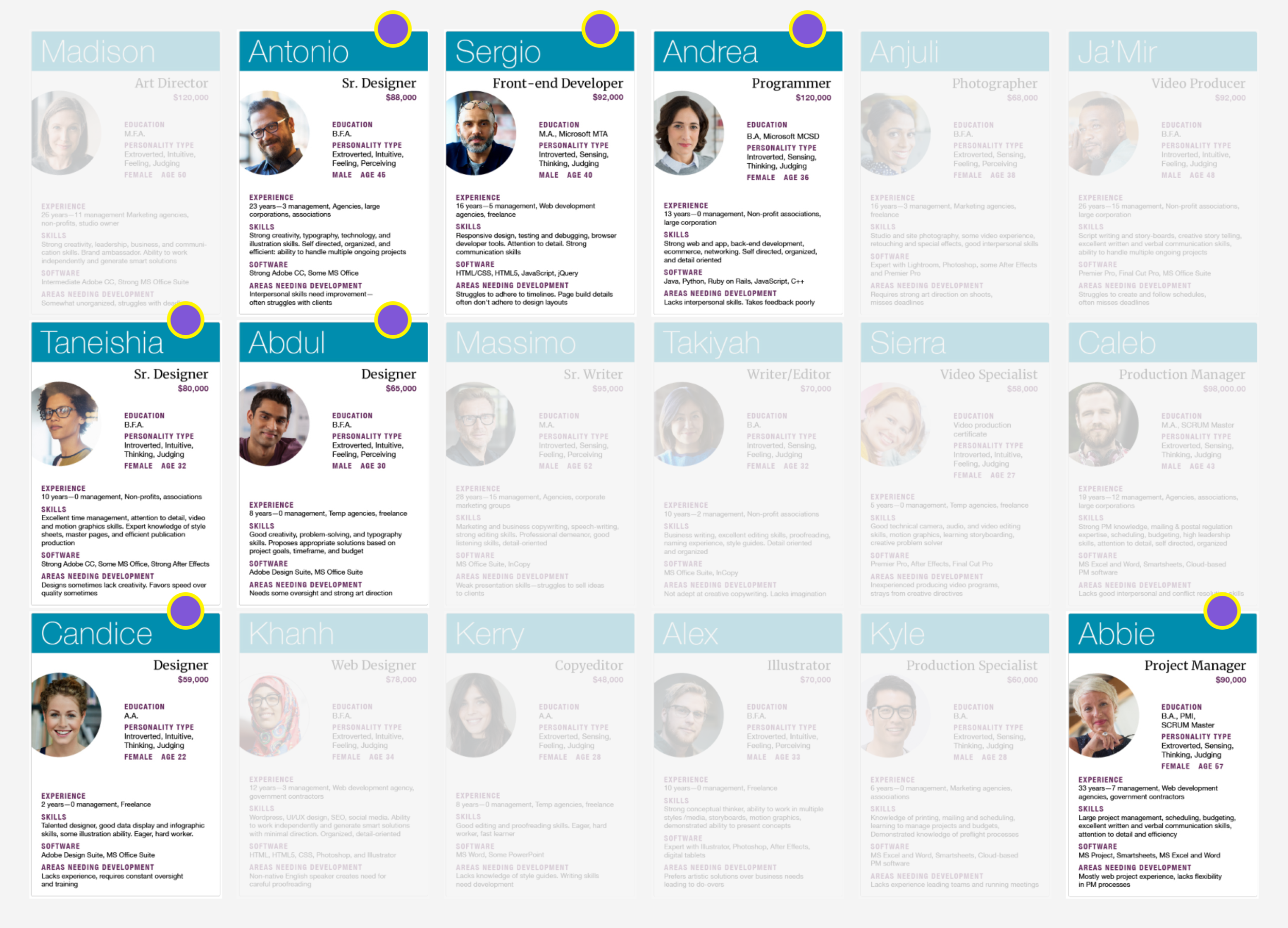
Of this reduced list of 7 candidates, here are the team members I would hire to begin working on the Microsoft Meeting Locator:
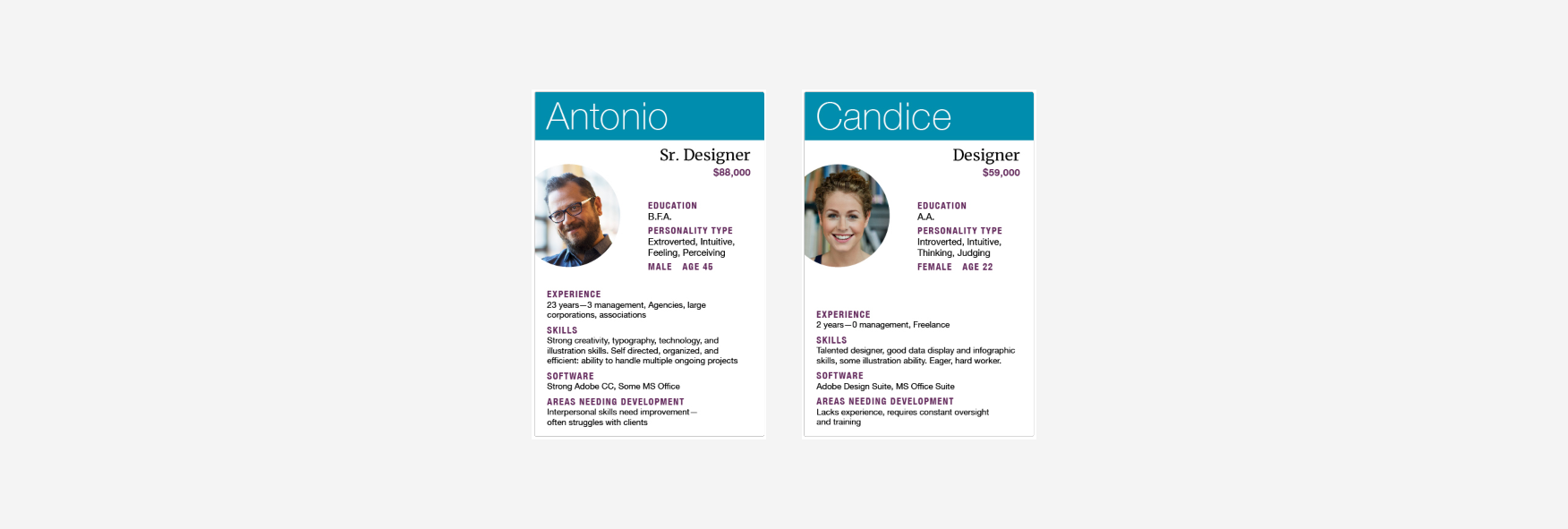
Design.
The designers I would hire are Antonio and Candace. Of the available 4 candidates that were designers, Antonio was the only Senior Designer with an extrovert personality. He also has 23 years experience and has a wide array of skills. His area of improvement is ‘working with clients.’ I actually think that could be manageable for this project, since the client would be Microsoft instead of an agency, studio, or other. The other designer I would hire is Candice. She is an eager, hard worker who is new to the field but has data analytic skills. This would be a great asset to leverage when thinking through how to visualize different routes in the app. I think pairing these two designers could produce a dynamic combination. The senior designer is outgoing and experienced while Candice is introverted but eager to learn. I think Antonio could mentor Candice on this project and help grow her technical and creative skills. I feel very optimistic about the designers.
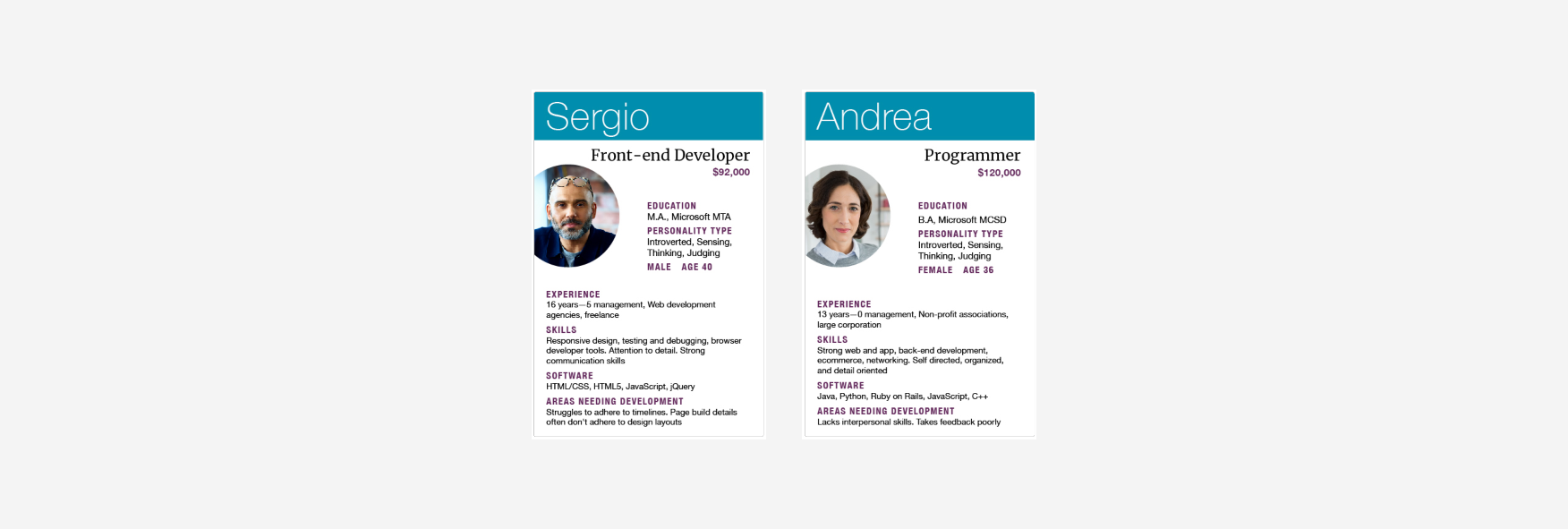
Development.
The engineers I would hire are Sergio and Andrea. This was an easy choice, as they were the only two candidates with engineering experience. There was a Web Developer whcih is similar, but not needed for this project. Thankfully, I believe Sergio and Andrea have the potential to make a great team. They both have a tremendous amount of experience and have very different specialties. Sergio is a front-end developer while Andrea is more of a back-end engineer. Both disciplines are needed on this project. They also have very similar career expertise and are introverted. Combined, I think they would work as peers rather than one leading the other. The potential problem areas are the fact they are both introverted and have difficulty adhering to a timeline. For that reason, we will need a talented project manager.
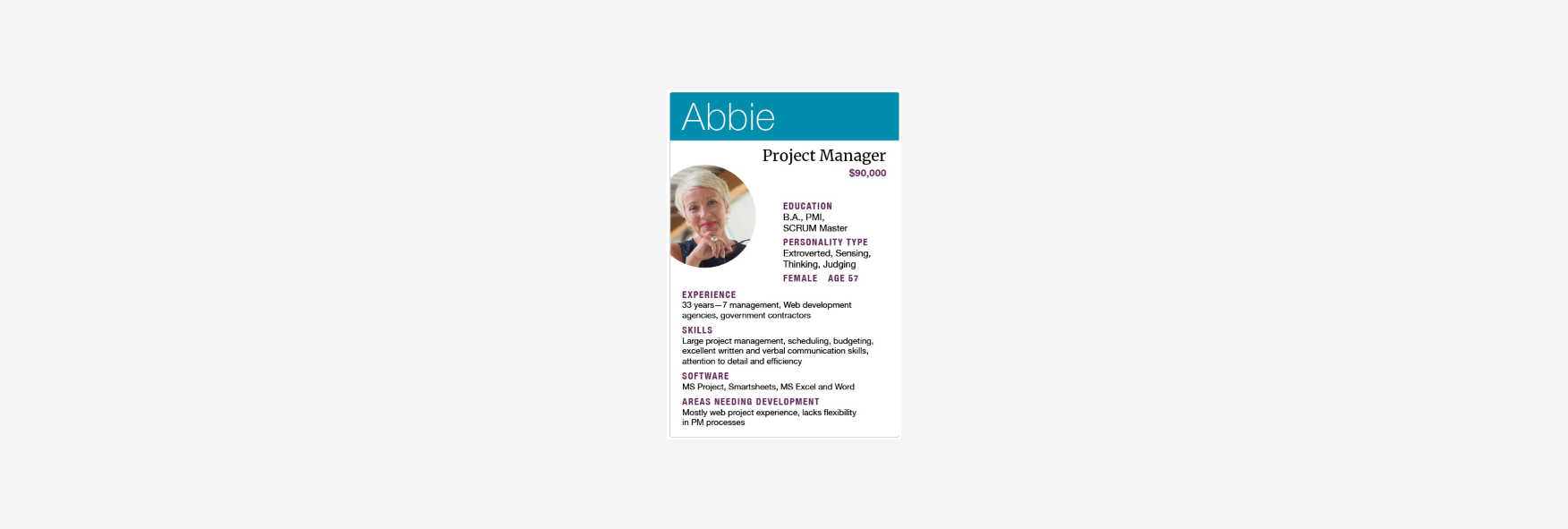
Project Management.
The project manager I would hire is Abbie. She was the only available project manager, so this was an easy choice. Thankfully, she has a tremendous amount of experience (33 years) and seems to add the right personality blend to keep this team on track. She is extroverted and skilled in scheduling. The fact she is a woman could also set other members up to have a confident and successful mentor (thinking of Candice the designer).
One of Abbie’s ‘areas of improvement’ concerns her lack of flexibility in using PM methodologies. Fortunately, she is a trained SCRUM master and this project will be using that methodology. It is an area to work on, but it won’t be a problem here.
Positive opportunities.
The team of 5 is evenly distributed across the 3 needed disciplines. The total team cost would be $449,000 which is well below the annual salary budget of $600,000. I considered hiring additional people to hit our cap but decided against it to reserve that money for future hires if we discover there is a gap in talent. I believe this small but agile team could work really well together. The blend of personalities and experience has the potential to create a growth atmosphere for the entire team. We have both experienced and junior team members. There is a blend of male and female, as well as introverted and extroverted.
Potential concerns.
As optimistic as I am about this team’s ability to thrive and produce a great result, it’s important to address any potential concerns that could develop. The main concern I have deals with the blend of extroverted and introverted personalities.
Of the 5 team members, just two are extroverted (Antonio, senior designer & Abbie, project manager). It’s not a huge concern, but I’d ideally have more extroverted personalities than introverted on a quick-moving project like this. The concern I have with this balance is that difficulties, concerns, or problems may not be voiced so they can be addressed. With a small team, communication is key and having more introverted personalities could make that more difficult.
Course component 6
Project budget.
When considering which budgeting approach to use for the purposes of this project, I began by researching how Microsoft budgets and pays for internal projects similar to this. I found that team budgets are used to cover salaries and cross-department requests. Using this information, I calculated the salary breakdown by discipline. I then calculated the cost per task before finally calculating the total project budget.
Microsoft team budget = total salary amount + discretionary lump sum
Staff.
The team that will be hired to tackle this project include designers, engineers, and project management. The annual salaries for each employee by discipline are as follows:
To read the project budget report, open this Google doc.
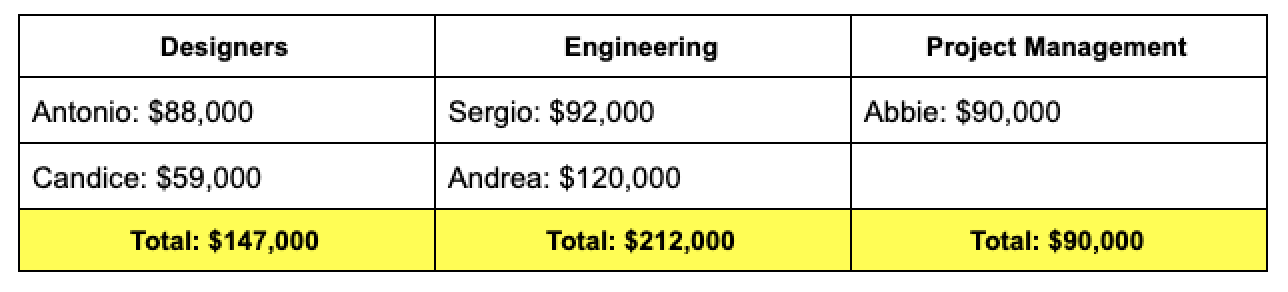
By understanding the total cost associated with each discipline, I will be able to better estimate the associated value of each hire. For example, the two engineers account for a combined $212,000 total salary. To ensure this investment is warranted, we will expect them to make the largest contribution to reaching our goal. Similarly, Abbie (our project manager) accounts for the lowest total salary at $90,000. From the previous module, that role is prioritized below both engineers and designers so it makes sense that the salary does as well.
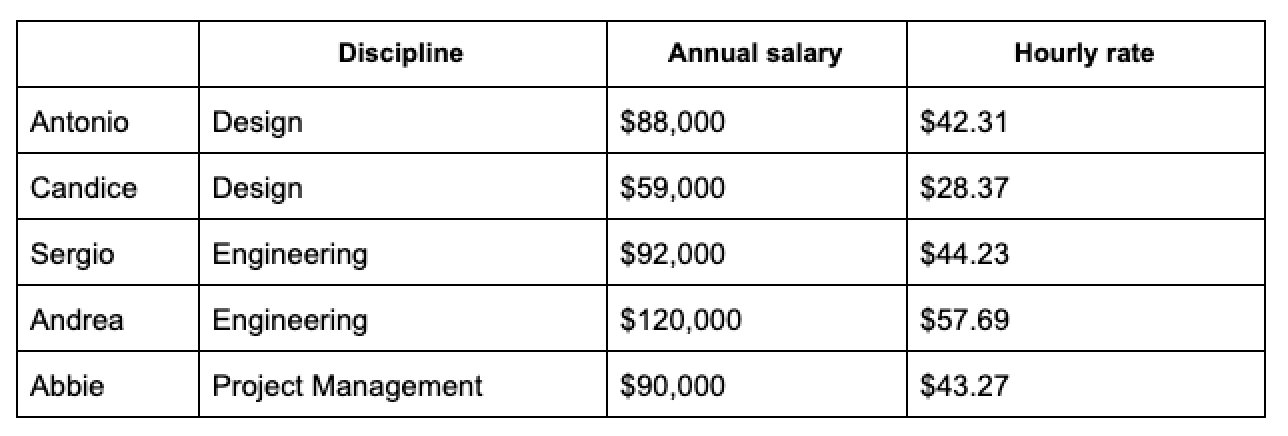
To understand the estimated cost per task, we must also consider how these salaries are represented as hourly rates.
MVP tasks.
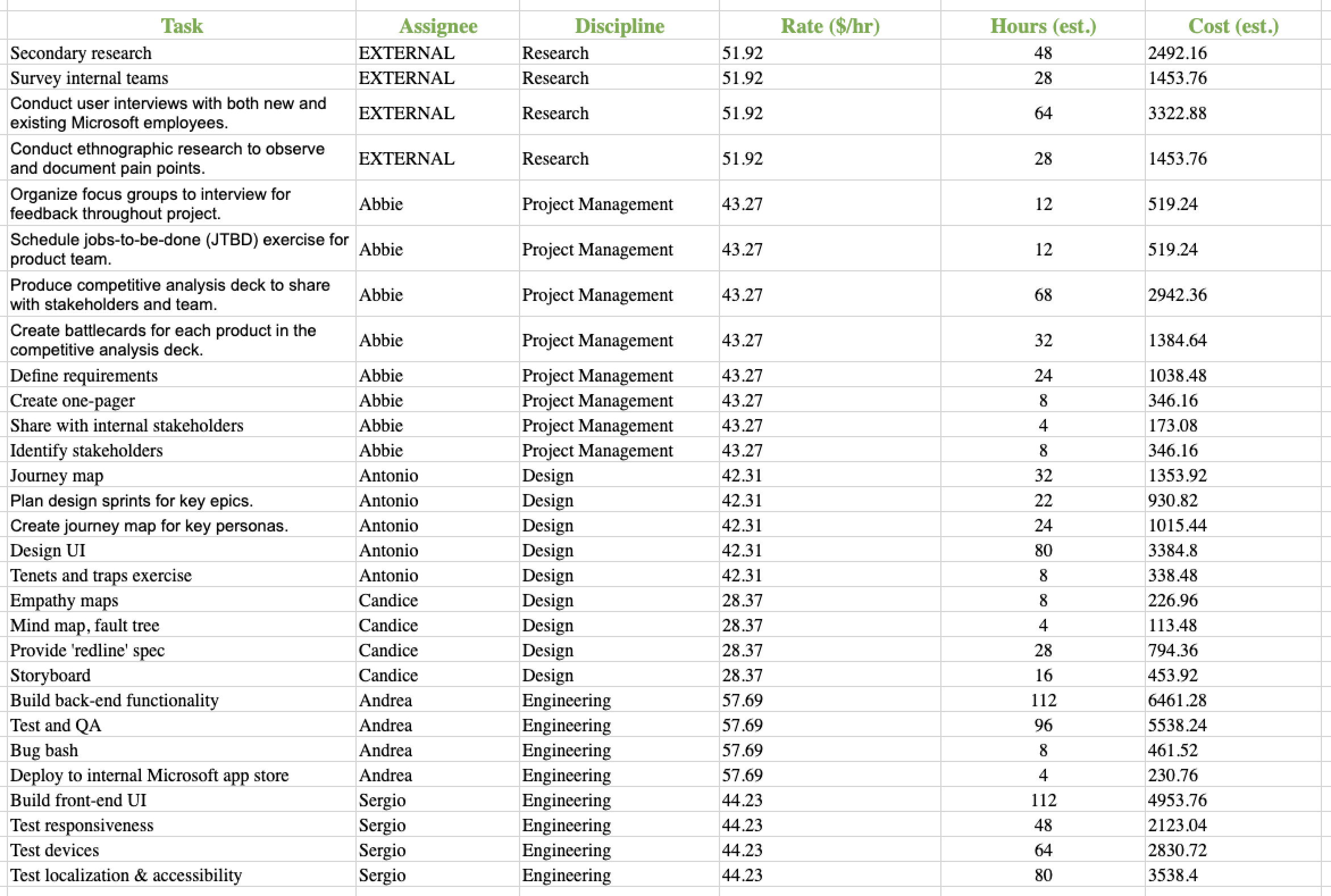
The following list of tasks account for the lift required to produce an MVP product we can deploy internally at Microsoft to begin getting feedback. Accomplishing each task below will require the team above to work together.
To review the entire Excel doc, please visit this link.
Total cost.
The cost breakdown below reflects how much it will cost each team member to complete their tasks. These are rough estimates, but would help spot potential areas of concern, where a person's salary far outside their contribution.

Summary.
The total cost of achieving a product MVP is $50,741.82. I’ve estimated that this will take 1082 hours, or roughly 6.5 months.
Considering that the total team salary amount is $449,000 and the total team budget is $600,000, we can now see the total value of our remaining discretionary funds.
Microsoft team budget = total salary amount + discretionary lump sum
Using the formula above, we can pay our staff and complete an MVP product for $499,741.82. This leaves $100,258.18 of discretionary funds. This is a healthy amount and can be used in a variety of ways. Paying for external talent (similar to Research above) and paying for team morale events are two of the most common uses.
If the team could hit this milestone, it would give them the opportunity to share it internally within Microsoft to get feedback. Having a product to review would likely accelerate progress. Achieving the MVP would also act as a good benchmark to assess the strengths and weaknesses in the team. At that point in time, we may realize that additional resources need to be added to the team to reach our next set of goals.
Course component 7
User personas.
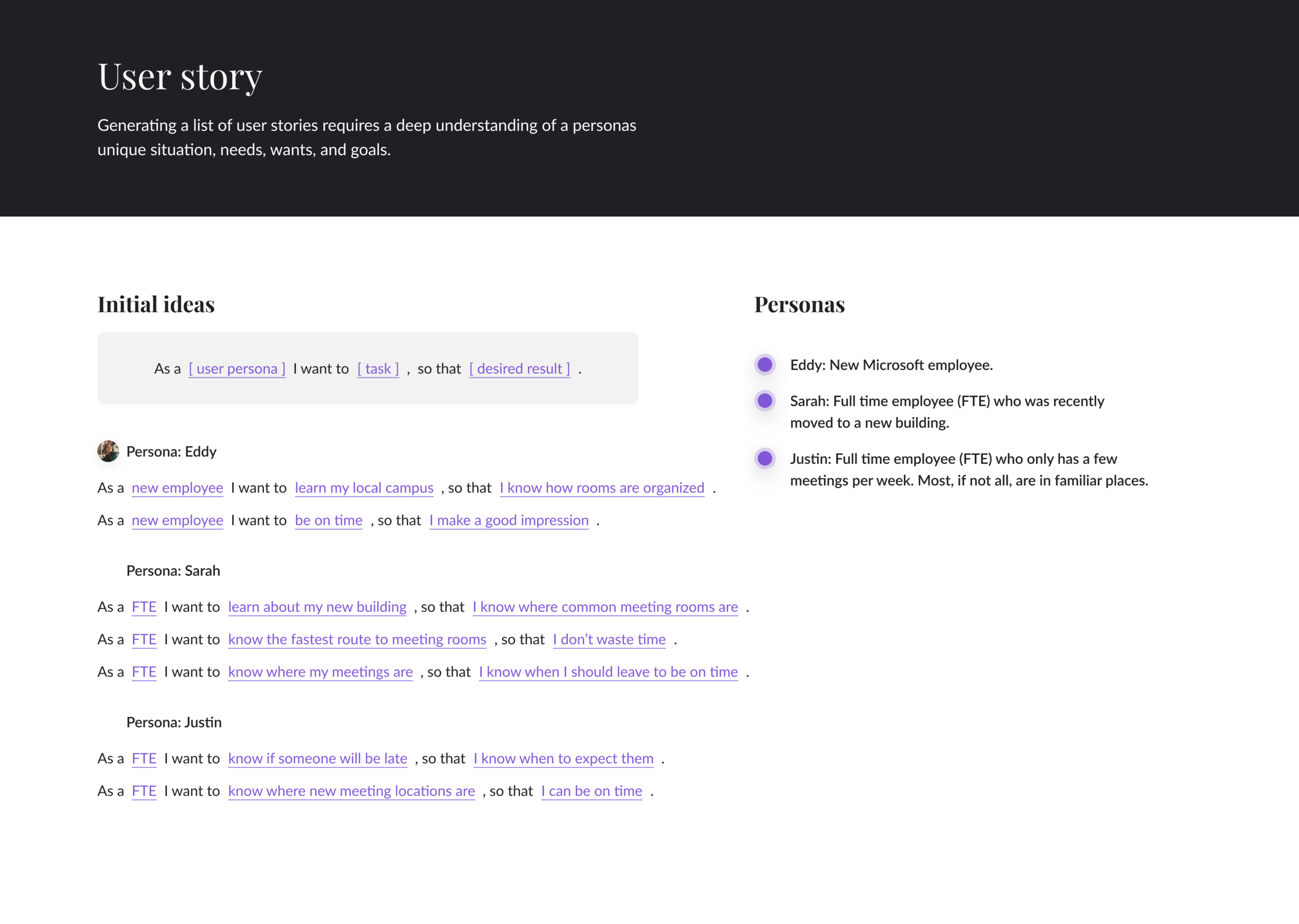
When thinking about the different types of people who would actually be using the product I am developing, I began by revisiting the initial research conducted in an earlier component. After talking with teammates and conducting secondary research, I realized the primary audience for this product will be new and existing Microsoft employees. These two groups can quickly be subdivided to better understand different situations, personalities, and wants. I have created four personas to expand on these diverse needs. Each persona is fictional but based on real traits I observed.
To read the full persona report, open this Google doc.
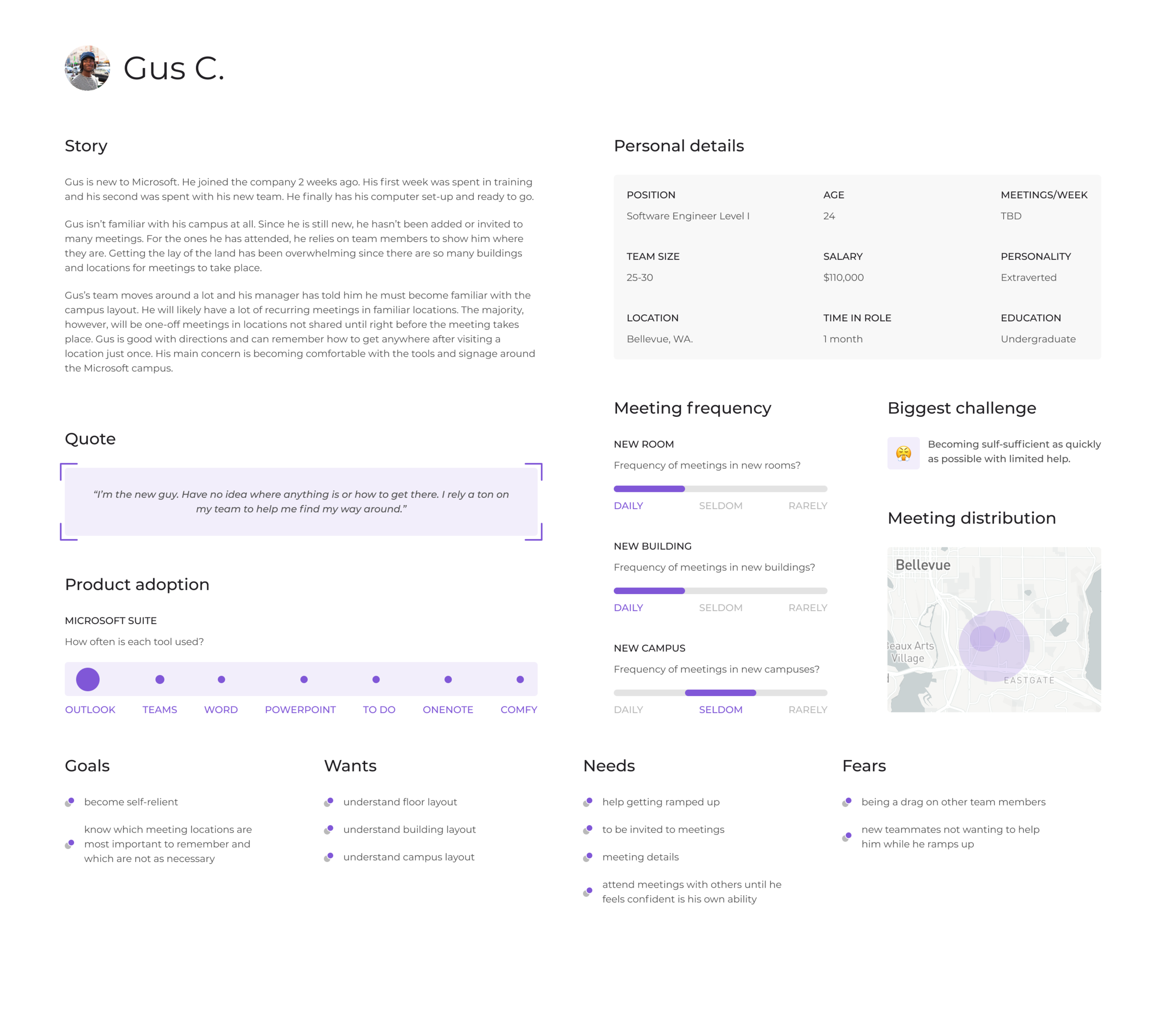
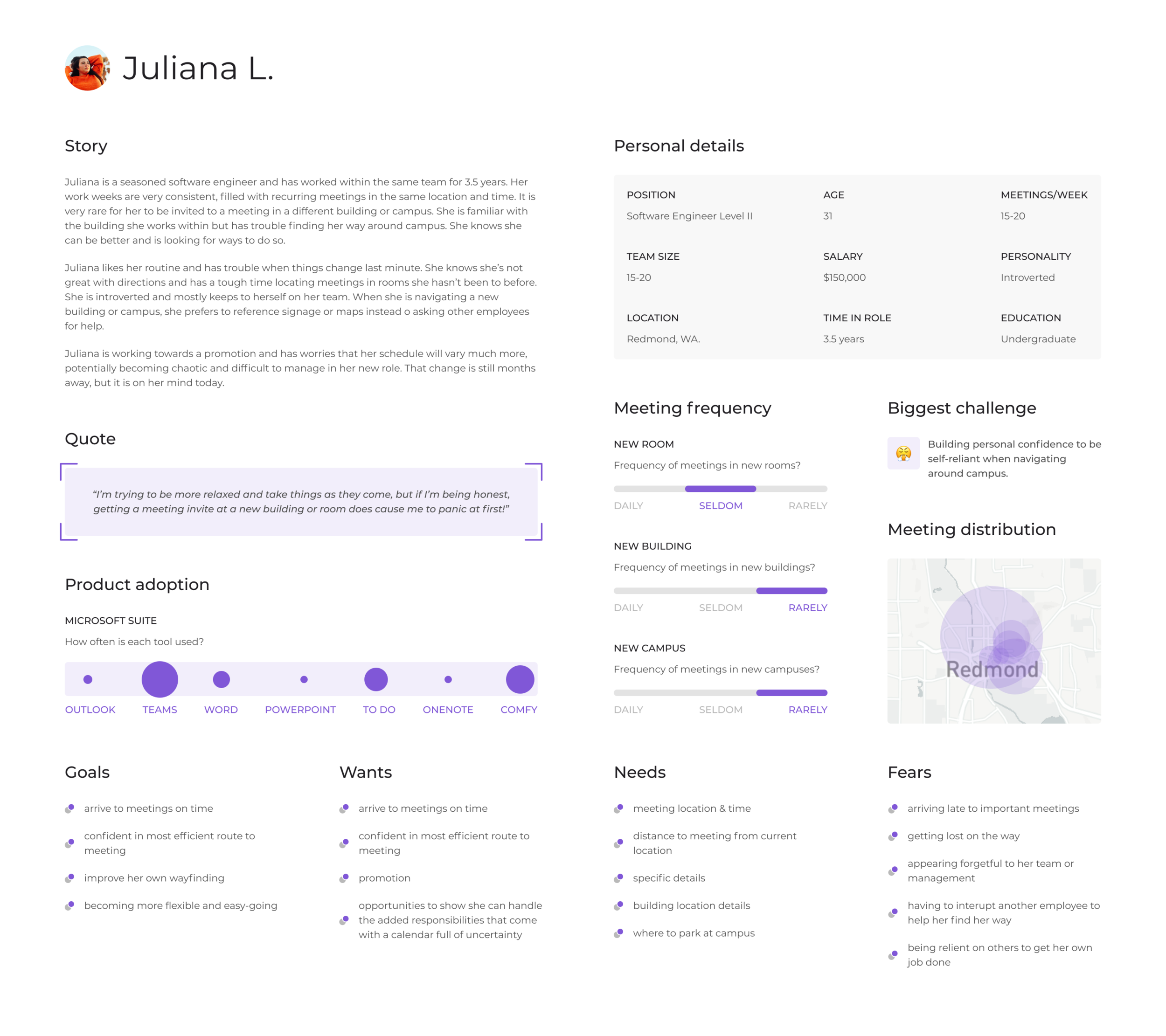
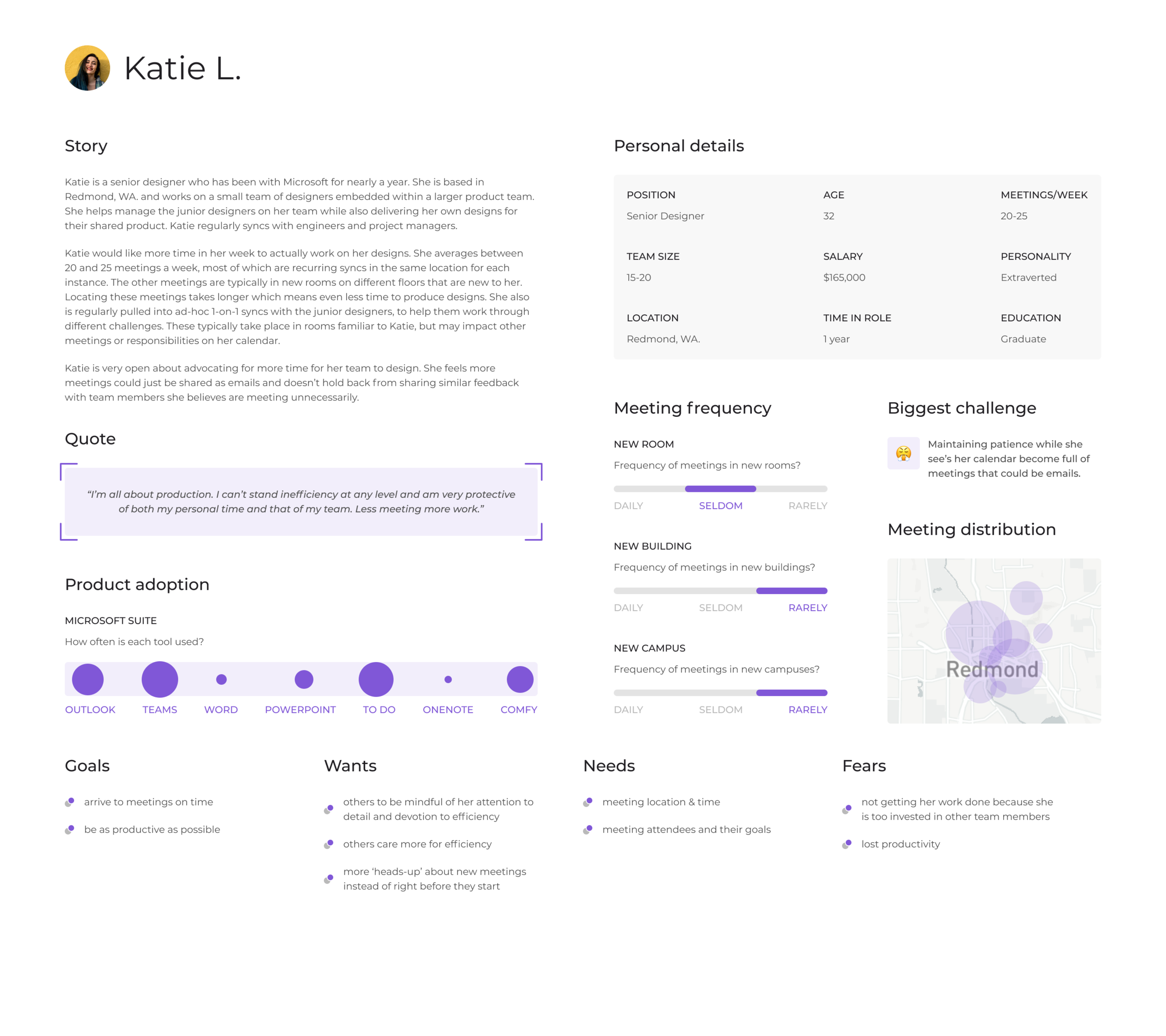
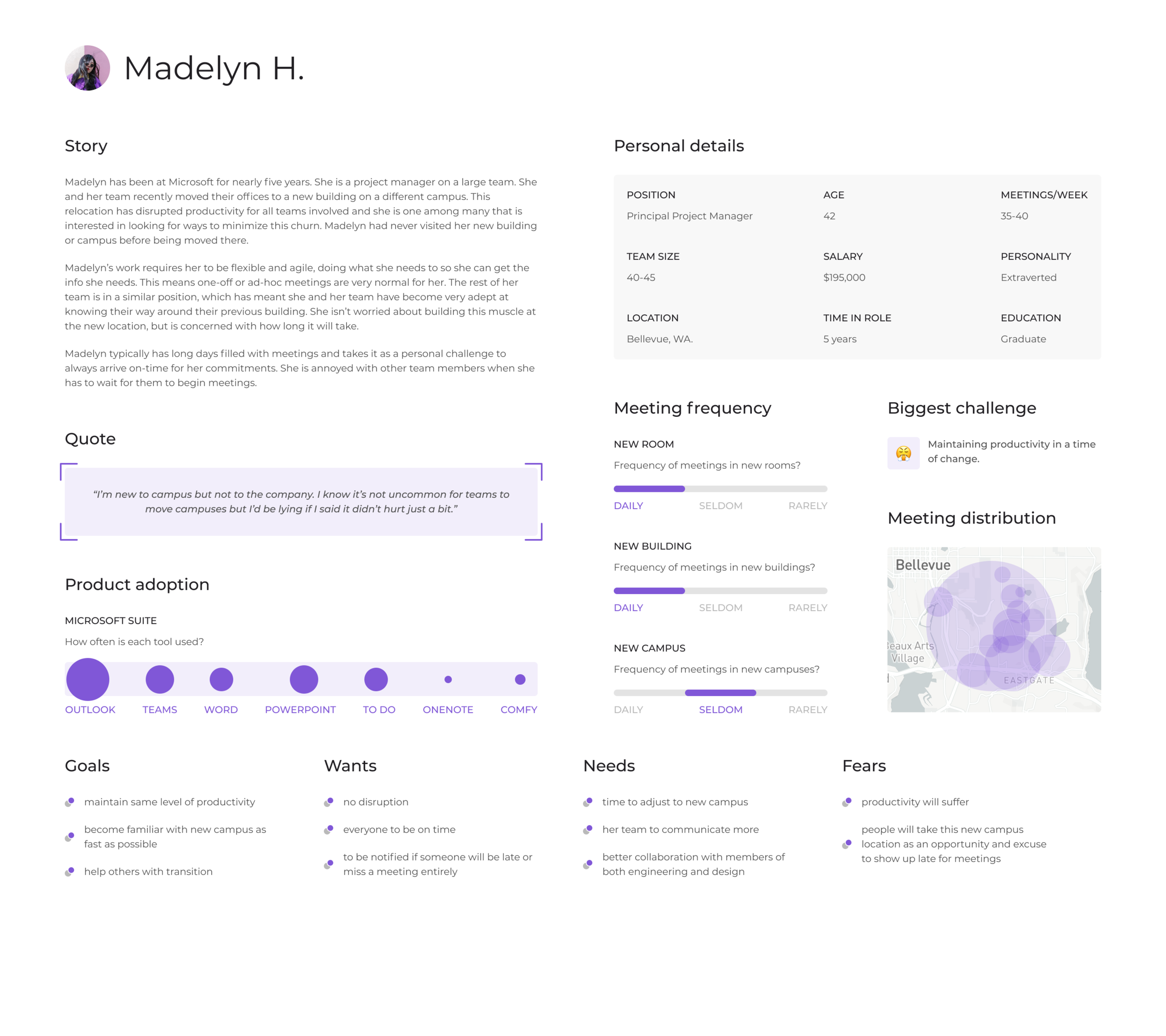
This was an incredibly helpful exercise. Creating personas and putting myself in the minds of potential users helped me uncover ideas and uses I hadn’t thought about. One of the main takeaways I had was how different the needs and uses between new and existing Microsoft employees would be. These two groups have very different situations and would likely need very different experiences from this product to provide any value.
One consideration I had while outlining Gus’s persona was potentially marketing this solely on new employees. I believe they would find the most value in such a product and could be a perfect test group to explore new features. Other, existing Microsoft employees could always use the product as well, but it would be marketed primarily towards new hires. I’m not 100% sold on the idea but would like to explore it further, especially as an MVP product.
Course component 8
Moodboards.
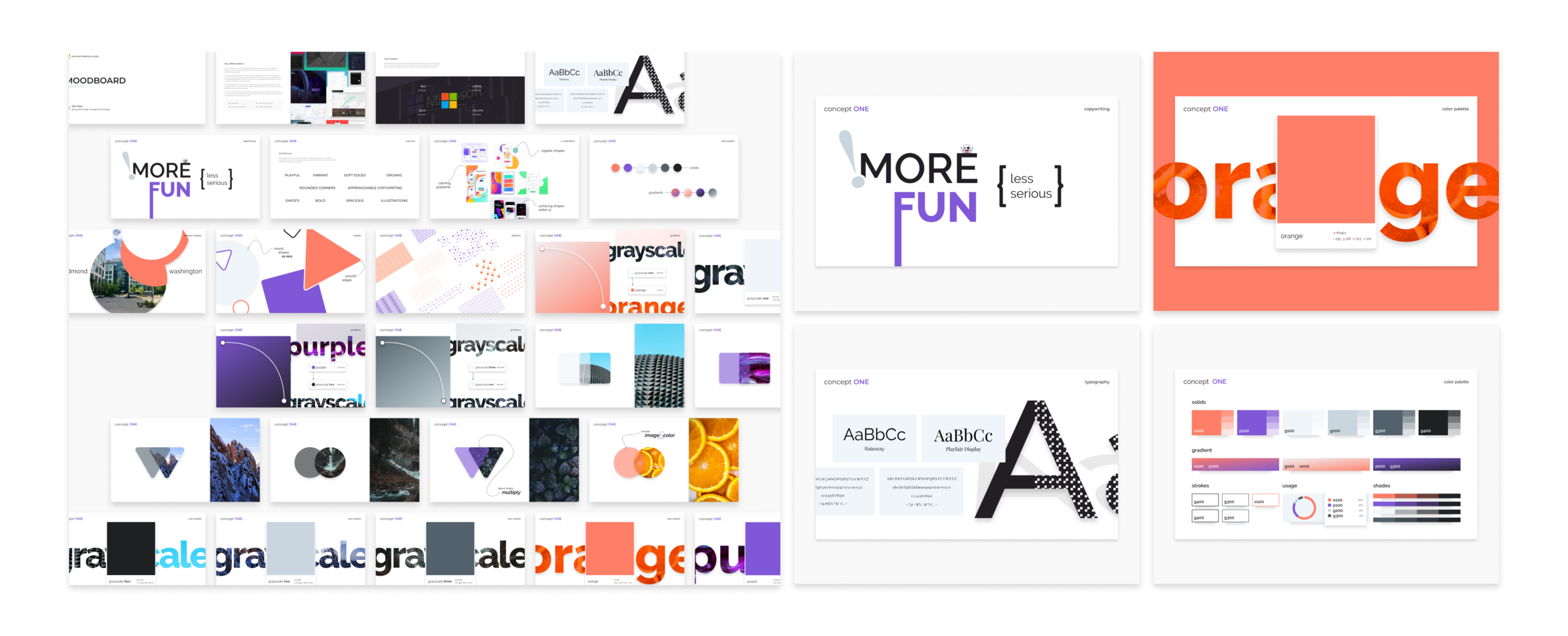
As part of this excercise, I explored style and product themes in two different directions. I created a moodboard of various assets and topics to help illustrate the contrasting styles of each.
The major difference between each theme is their style and aesthetic. The actual usage, customer flows, and task flows will remain largely the same across concepts. Spending time now on exploring different themes will help ensure I am creating the right product for the customers identified in previous modules.
The first moodboard concept is about creating a fun, playful app experience for Microsoft employees. Vibrant colors, illustrations, shapes, copywriting, and more all combine to create a simple and casual product experience.
The second concept is more serious. Dark colors, simple type, and angular lines all combine to create a no-frills app experience. This concept may be more successful for those users who want to use the app sparingly and quickly.
Course component 9
Focus group.
Given the current state of living in a COVID-19 pandemic, planning this focus group assignment came with some unexpected challenges. My initial plan was to host three focus group sessions. Each would be small in size and focused on a different topic I found important in deciding which direction to take the end-design. That plan was thrown out as it became obvious how difficult it would be to schedule these events remotely with a set of volunteers that quickly dwindled. The route I took instead was focused on a single topic with a breadth of participants. My goal was to focus the majority of time on this single topic, while simultaneously trying to tease out information that could help me understand other topics.
My focus group included 5 people. One is a current Microsoft employee. One was a former Microsoft employee. One works in a similarly sized company to Microsoft, which meant he could empathize with the core problem I am seeking to solve. The other two are not in the tech industry but understood the situation and problem.
To read the full focus group report, open this Google doc.
Course component 10
Client presentation.
This assignment gave me the opportunity to present the Microsoft Meeting Locator project to a fellow Microsoft employee for feedback. He was part of the initial round of user interviews I conducted in an earlier module. This meant he had some background info on the project but hadn't seen any of the progress in between.
In an effort to get more feedback on as much work as possible, I structured the presentation to mirror the practice presentation we ran through as a class. I shared the following designs:
Design concepts 1 & 2 (PDF presentation, 30 slides)
Pinterest mood boards for each concept
Persona series (Figma prototype)
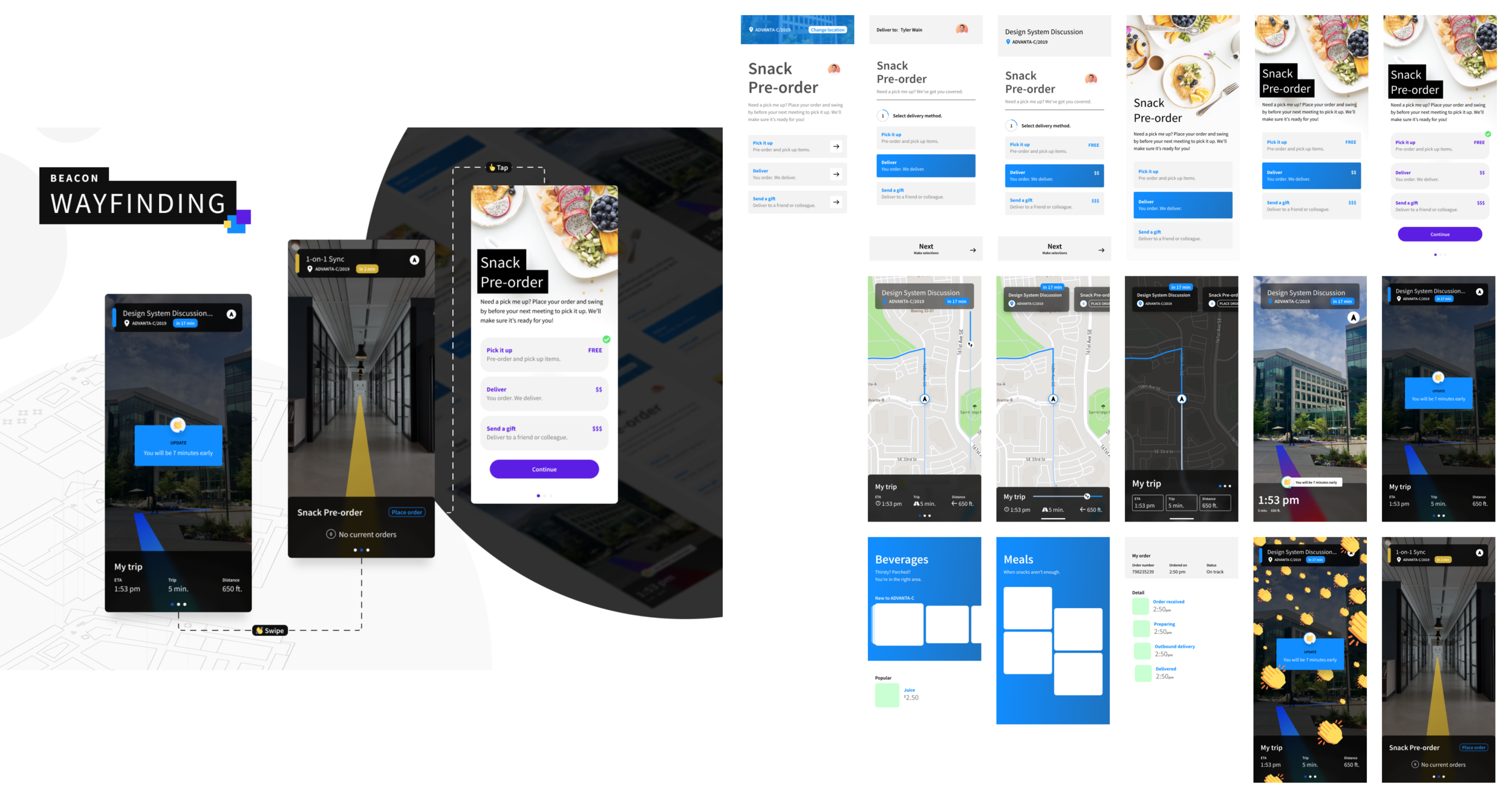
Aspirational designs (Figma)
This assignment was really helpful in learning even more about what changes would need to take place for a project like this to work. It gave me the opportunity to sharpen and practice my presentation skills. It also helped give me insight into what possible next steps would be to get more input from a wider audience. One of the things I must remember while presenting ideas and projects like this is that the audience doesn’t have all the background info on the project that I do. I must remember to take the time up front to explain the problem and goal at a high level. This helps set the presentation up so we can all be on the same page when evaluating the potential value
To read the full client presentation report, open this Google doc.
Pinterest boards
Client presentation.
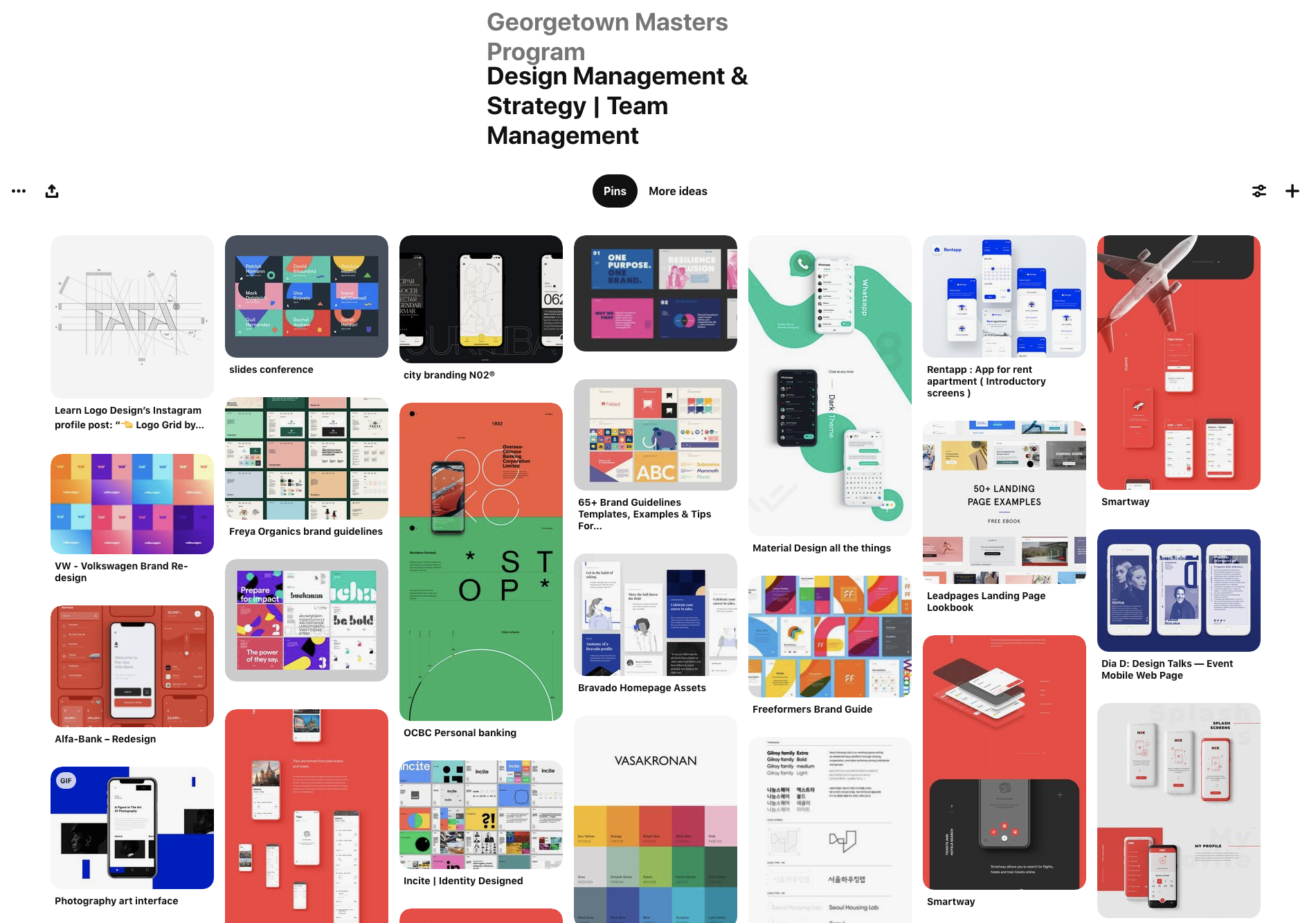
This board was focused on gathering inspiring pins on team management. Most of the pins I chose dealt with managing the creative output of a team. Items and inspiration I pinned included design systems, style guides, planning docs, and documentation inspiration.
I think one of the best ways to ensure a design team is aligned in the styles they use, is to build and share a design system. Design systems are collections of best practices as it relates to visual style, voice and tone, development & engineering, imagery, patterns, and more. Having buy-off from leaders to actually build a design system can be a huge challenge. There are dozens are articles and analyses that show how impactful design systems can be. Another challenge with systems is actually getting the organization to use it once its started. A design system is really only as strong as the adoption rate amongst the team it was built to serve. I've been on teams that didn't use them and it was incredibly frustrating and tedious to have designs and experiences that didn't match. I've also worked on teams that rallied around their systems. These teams were more efficient and productive by a longshot. The leaders on this second set of teams stressed the importance of and adherence to using the system. They also stressed how important it was to constantly test its limits and push the boundaries whenever possible. That was the only way to ensure the system would be a living document that didn't become outdated each week.
To see the referenced Pinterest board, visit this link.
Project schedules.
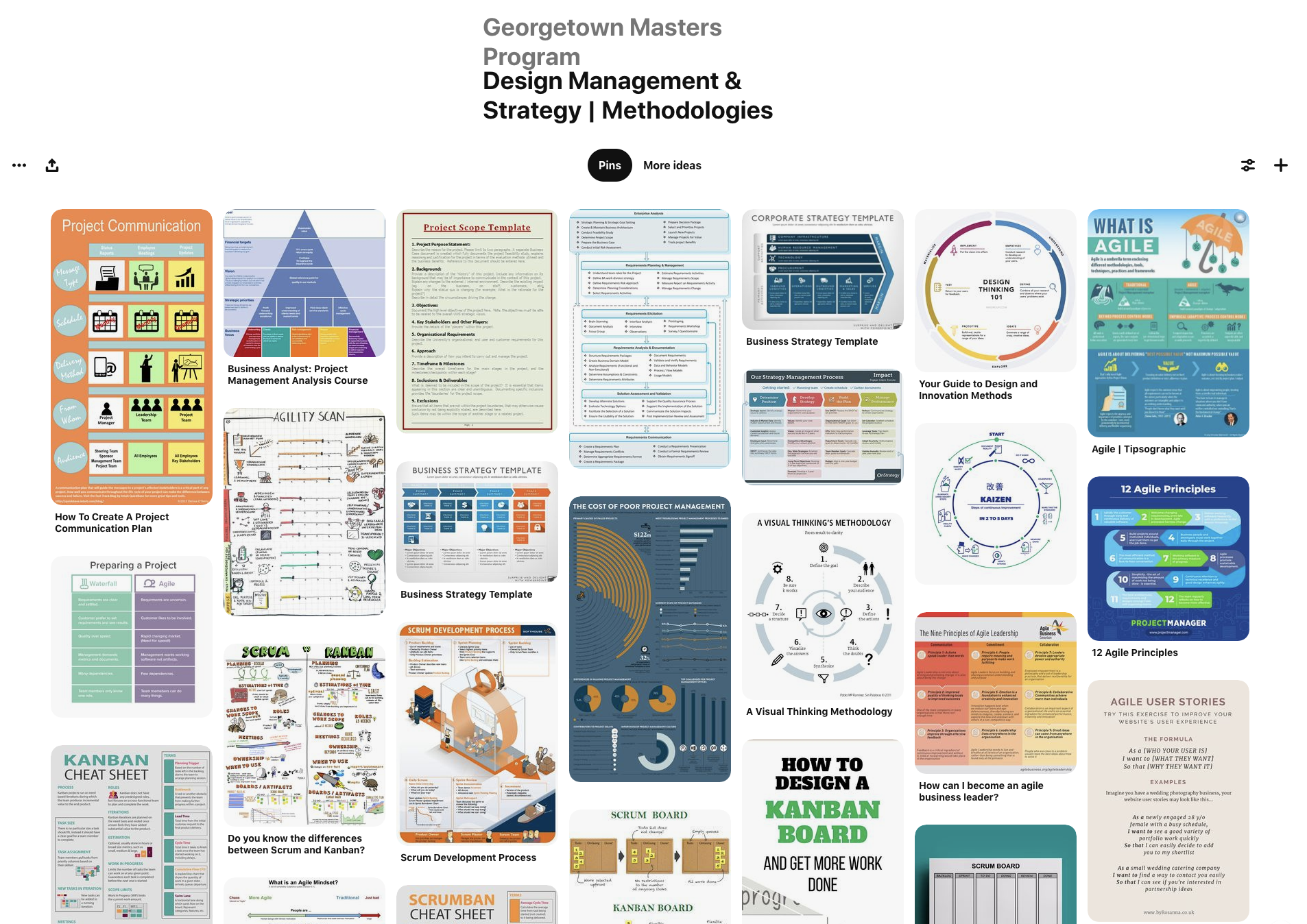
When creating this board, I focused on finding pins on design process, development methodologies, cheat sheets, and comparisons. Let me know what you think.
To see the referenced Pinterest board, visit this link.